How can we help?
Short, step-by-step guides for the things people ask about most. My Prayer Connect is free for every member and every group.
Step guide 10
Manage a group — for leaders
- Open Groups and select a group you lead. To start one, fill in Start a new group and tap Create group.
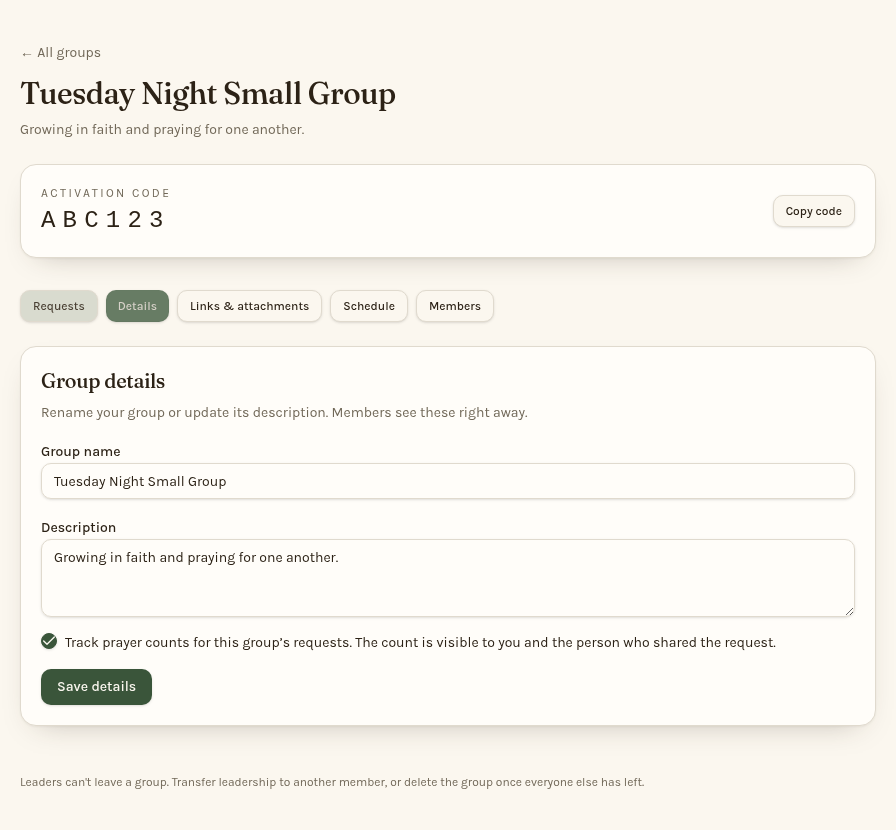
- Use Copy code to share its activation code privately. Or choose Members, then Manage members, and use Invite by email to send invitations. Separate multiple email addresses with semicolons and tap Send invites.
- Choose Details to edit the name, description, or prayer-count setting, then tap Save details.
- Choose Schedule to set meetings and reminders, or Links & attachments to share group resources.
- Under Manage members, use Make co-leader to share leadership duties, Remove to remove a member, or Make leader to hand over leadership. Review any confirmation before continuing.
Only leaders and co-leaders manage group settings and members. Make leader transfers leadership: you step down but remain a member. Keep activation codes within your group.
Still stuck? Email info@myprayerconnect.com and we'll gladly help.
Create your free account