How can we help?
Short, step-by-step guides for the things people ask about most. My Prayer Connect is free for every member and every group.
Step guide 2
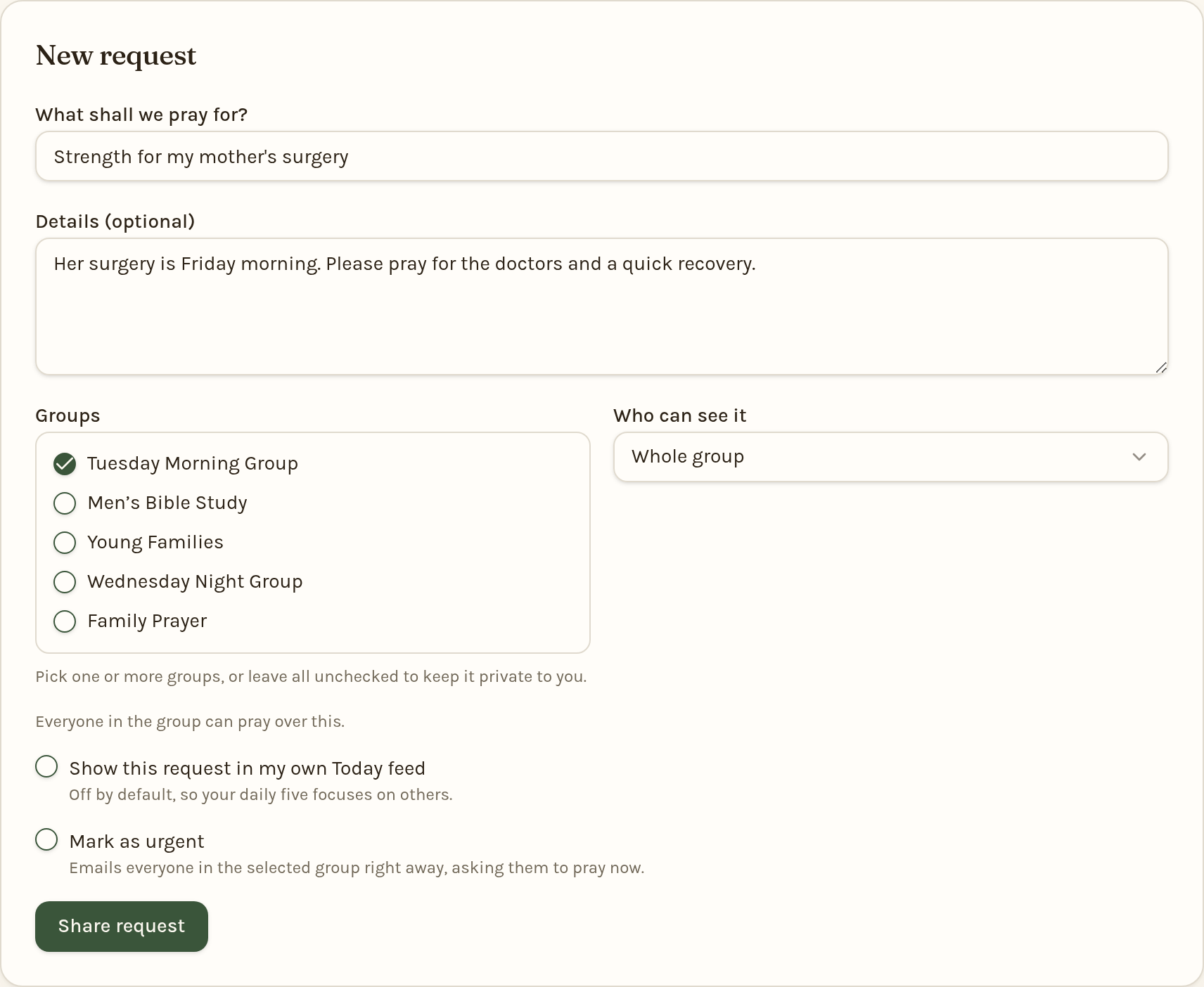
Add a prayer request
- Sign in and open Requests from the menu at the top.
- Under New request, type a short title in What shall we pray for? — for example, "Strength for my mother's surgery."
- Add any Details you'd like to share (optional).
- Choose which Groups should see it. You can pick more than one group, or none to keep it as a personal request.
- Choose Who can see it: Whole group, Leaders only, or Just me.
- Tap Share request (or Save private request if no group is selected).
Later, you can post updates on a request, or mark it Answered or Closed so it leaves everyone's prayer list. If it stays open without an update, we'll email you after 30 days and every 30 days thereafter to ask how things are going.
Still stuck? Email info@myprayerconnect.com and we'll gladly help.
Create your free account